

AZ-104 tests whether you can run an Azure environment: identities and governance, storage, compute, virtual networking, and monitoring. You get 100 minutes, and you need a scaled score of 700 out of 1,000 to pass. The plan in this guide follows Microsoft’s own skill weights: spend the most time on identities and compute, practice everything hands-on in Azure, then use Microsoft’s Practice Assessment to decide when to book. Facts checked on Microsoft Learn on November 11, 2026.
Know the exam
AZ-104 at a glance
| Exam | AZ-104: Microsoft Azure Administrator |
|---|---|
| Certification | Microsoft Certified: Azure Administrator Associate |
| Level | Intermediate |
| Exam time | 100 minutes |
| Passing score | 700 or greater, on a scale of 1 to 1,000 (a scaled score, so it may not equal 70%) |
| Languages | English, Chinese (Simplified), Korean, Japanese, French, Spanish, German, Portuguese (Brazil), Chinese (Traditional) and Italian |
| Delivery | Proctored, online or at a test center, scheduled through Pearson VUE |
| Price | Set by the country or region where you take the exam |
| Renewal | Every 12 months, through a free online assessment on Microsoft Learn |
| Current skills list | Skills measured as of October 26, 2023 |
Microsoft doesn’t publish an AZ-104 question count or a pass rate. Its general guidance is that most certification exams have 40 to 60 questions, and that the number varies by exam.
If you are still choosing between clouds, our comparison of AWS and Azure certifications (opens in a new tab) covers that decision first.
Know the exam
What the exam covers
Microsoft’s study guide splits AZ-104 into five skill areas, each with a weight range. The ranges tell you roughly how much of the exam each area takes up.
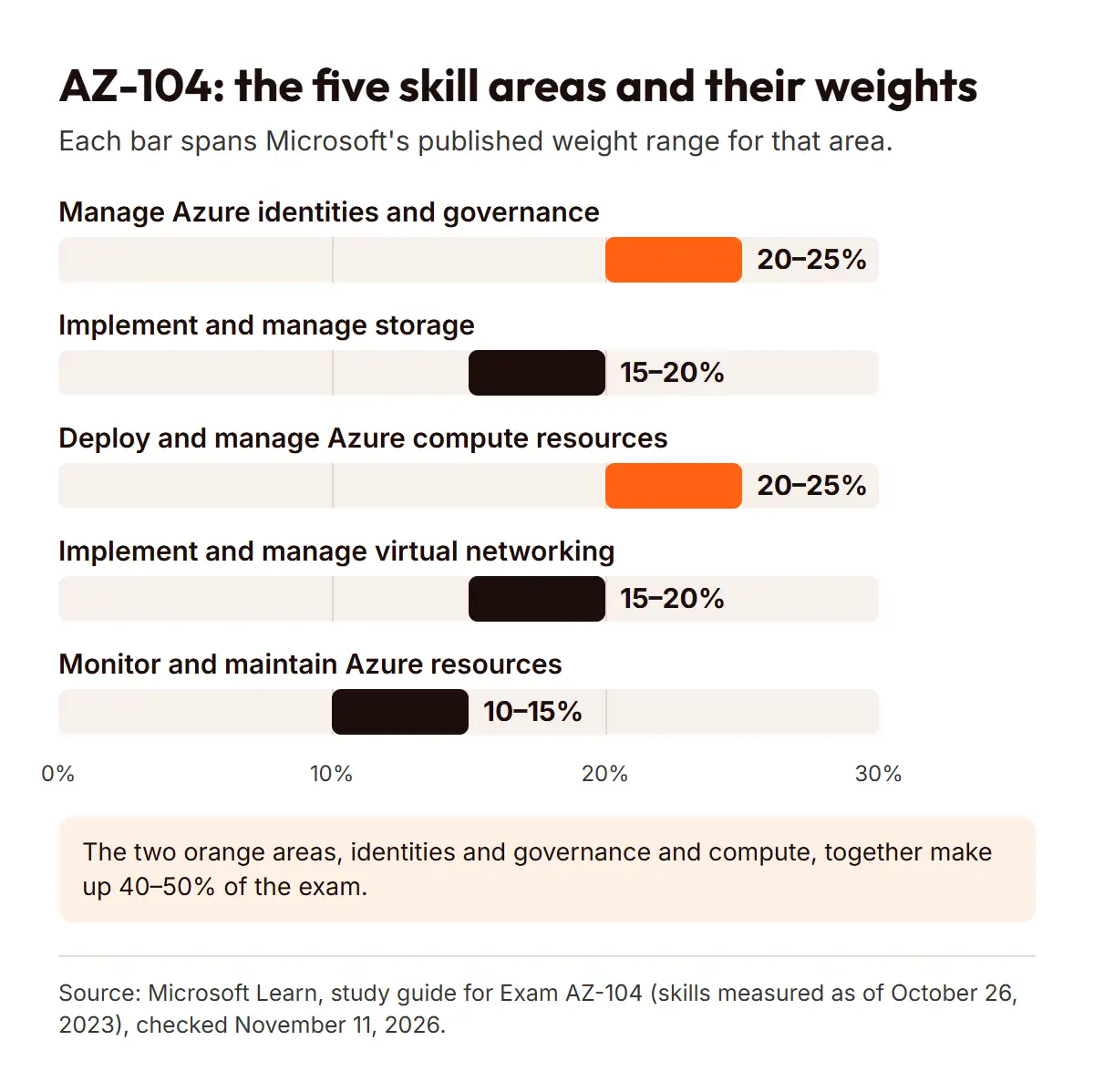
| Manage Azure identities and governance | 20–25% | Microsoft Entra users and groups; access to Azure resources; subscriptions and governance |
|---|---|---|
| Implement and manage storage | 15–20% | Access to storage; storage accounts; Azure Files and Azure Blob Storage |
| Deploy and manage Azure compute resources | 20–25% | ARM templates or Bicep files; virtual machines; containers; Azure App Service |
| Implement and manage virtual networking | 15–20% | Virtual networks; secure access to virtual networks; name resolution and load balancing |
| Monitor and maintain Azure resources | 10–15% | Monitoring resources; backup and recovery |
Two things to note from Microsoft’s study guide. Most questions cover features that are generally available, but the exam may include Preview features if they are commonly used. And English is updated first: localized versions follow about eight weeks after an English update.
Who the exam is written for
Microsoft describes the candidate as someone familiar with operating systems, networking, servers and virtualization, with experience using PowerShell, the Azure CLI, the Azure portal, Azure Resource Manager templates or Bicep files, and Microsoft Entra ID. That is a description of the role Microsoft has in mind, so use it to spot gaps in your own experience.
Plan and practice
A study plan weighted by the skills outline
This section is EvolveSkill’s guidance, not Microsoft’s. Microsoft doesn’t publish a recommended study time, so treat the schedule below as an example to adjust, not a promise.
The principle is simple: give each skill area time in proportion to its weight, and learn every topic by doing it in Azure, not only by reading about it.
| 1 | Identities and governance (20–25%) | Create users and groups in Microsoft Entra ID, assign roles, apply policies and tags, and set up a budget alert |
|---|---|---|
| 2 | Compute (20–25%) | Deploy virtual machines from the portal, the CLI and a Bicep file; deploy an App Service app and a container |
| 3 | Storage (15–20%) | Create storage accounts, set access with keys and shared access signatures, and work with Azure Files and Blob Storage |
| 4 | Virtual networking (15–20%) | Build virtual networks and peering, secure them with network security groups, and configure DNS and a load balancer |
| 5 | Monitor and maintain (10–15%) | Set up alerts and logs in Azure Monitor, and back up and restore a virtual machine |
| 6 | Review and practice | Take Microsoft’s Practice Assessment, revisit weak areas, and repeat tasks you got wrong |
As an example, someone who already works in IT and can study a few hours a week might give each of phases 1 to 5 a week or two, then spend one to two weeks on phase 6. Go slower if Azure is new to you, and faster if you already administer it at work.
Plan and practice
Study resources, official first
Start with what Microsoft publishes, because it matches the current skills list:
- The AZ-104 study guide on Microsoft Learn: the skills list, the change log and links to everything else.
- Self-paced learning paths on Microsoft Learn, or the instructor-led course AZ-104T00, which Microsoft lists as a four-day course.
- The Exam Sandbox, which lets you try the exam interface before exam day.
- Microsoft’s documentation for each Azure service you study.
Third-party books, courses and videos can help, but check that they cover the October 26, 2023 skills list and current service names (for example, Microsoft Entra ID rather than Azure Active Directory).
Plan and practice
How to practice without dumps
Microsoft offers a Practice Assessment for AZ-104. A new version is available on AI Skills Navigator, and Microsoft says the older Practice Assessments on Learn are no longer being updated. Use it to find weak areas, not to memorize answers.
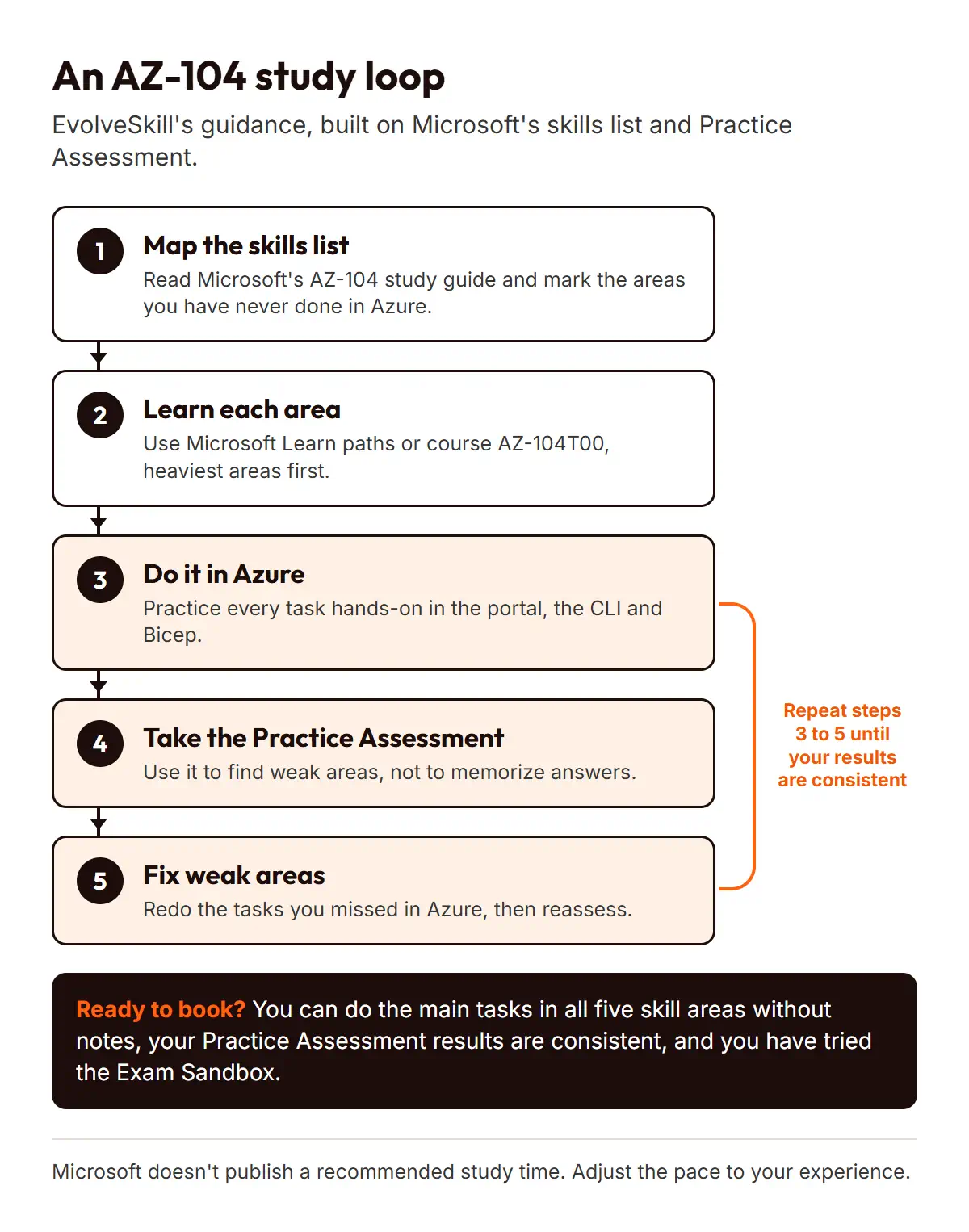
Avoid sites that offer “real exam questions” or dumps. They are often out of date, they can contain wrong answers, and they train you to recognize answers instead of doing the work. The exam expects you to apply what you know, and Microsoft says you may have interactive components to complete.
Book and keep it
Are you ready to book?
This checklist is EvolveSkill’s guidance. You are likely ready when:
- You can do the main tasks in each of the five skill areas without step-by-step notes.
- Your Practice Assessment results are consistent across several attempts, with no skill area far behind the others.
- You can explain why you would choose one option over another, such as a network security group versus Azure Firewall.
- You have tried the Exam Sandbox, so the interface won’t surprise you.
On exam day, Microsoft says you can open Microsoft Learn during associate exams such as AZ-104, but no extra time is added. Plan to use it to check a detail, not to learn a topic.
Book and keep it
Booking, retakes and renewal
You schedule the exam through Pearson VUE, online or at a test center. Microsoft strongly recommends registering with a personal Microsoft account (MSA), because records tied to a work account can be lost if you leave your organization. If the exam isn’t in your preferred language, you can request 30 extra minutes.
Price. Microsoft sets the price by the country or region where you take the exam, so there is no single figure. Our guide to how Microsoft prices exams by country (opens in a new tab) explains how to find yours. If you plan to book with a voucher, EvolveSkill’s Microsoft exam voucher collection (opens in a new tab) lists the exams it currently offers. Check that the exam code on the product page says AZ-104 before you buy.
Retakes. If you don’t pass, Microsoft lets you retake after 24 hours. After that, you wait 14 days between attempts, with up to five attempts in 12 months. Each retake is paid for.
Renewal. The certification lasts 12 months. You can renew it for free by passing an online assessment on Microsoft Learn during the six months before it expires. A pass adds one year from your expiration date.
Book and keep it
Next steps
- Read the skills list in Microsoft’s AZ-104 study guide and mark the areas you have never done in Azure.
- Set up an Azure account you can practice in, and work through the phases above, heaviest areas first.
- Take Microsoft’s Practice Assessment once you have covered every area, then use the readiness checklist.
- Check the price for your country, then book.
Reference
Frequently asked questions
Is AZ-104 difficult?
Microsoft doesn’t publish a difficulty rating or a pass rate. It rates AZ-104 as an intermediate exam and writes it for people who already work with operating systems, networking and virtualization. If you have that background and practice hands-on in Azure, it is a manageable exam. Without it, expect to need more time.
Is AZ-104 for beginners?
Not really. Microsoft lists AZ-104 at the intermediate level, and its audience profile assumes experience with PowerShell, the Azure CLI, the portal and Microsoft Entra ID. If you are new to IT, build basic networking and operating system skills first, then come back to it.
How long should I study for AZ-104?
Microsoft doesn’t publish a study time, and it depends on your experience. As EvolveSkill’s guidance, plan around readiness rather than a date: cover all five skill areas hands-on, then book once your Practice Assessment results are consistent. People who already administer Azure at work usually need less time than newcomers.
What score do I need to pass AZ-104?
You need 700 or greater. Microsoft reports scores on a scale of 1 to 1,000, and because it is a scaled score, 700 may not mean 70% of the questions. Aim to be comfortable in every skill area rather than relying on one strong area to carry you.
Can I take AZ-104 online?
Yes. Microsoft says that in most cases you can take its exams online with Pearson VUE’s online proctoring or at a local test center. You schedule either option through Pearson VUE. Microsoft recommends registering with a personal Microsoft account so your certification records stay with you if you change jobs.
Does the AZ-104 certification expire?
Yes. The Azure Administrator Associate certification lasts 12 months. You can renew it for free by passing an online assessment on Microsoft Learn during the six months before it expires. Passing extends the certification by one year from its expiration date, and you can retake the renewal assessment if needed.
Reference
Sources
All checked on Microsoft Learn on November 11, 2026:
- Microsoft: Study guide for Exam AZ-104 (skill areas, weights, skills date, Preview features, extra time, Practice Assessment)
- Microsoft: Microsoft Certified: Azure Administrator Associate (level, exam time, languages, price basis, retake, personal account)
- Microsoft: Exam scoring and score reports (scale and passing score)
- Microsoft: Exam duration and exam experience (question numbers, access to Microsoft Learn)
- Microsoft: Retake policy (waiting periods and limits)
- Microsoft: Renew your Microsoft Certification (renewal window)
- Microsoft: Register and schedule an exam (online or test center)
- Microsoft: Course AZ-104T00 (instructor-led course)
