
CompTIA A+ takes two exams, Core 1 (220-1201) and Core 2 (220-1202), both from the current V15 version. You can take them in either order, but both must come from the same version. Each exam has up to 90 questions in 90 minutes. You need 675 to pass Core 1 and 700 to pass Core 2. This guide turns CompTIA’s domain weights into a study plan for both exams. Facts checked on CompTIA’s site on November 11, 2026.
Know the exams
A+ V15 at a glance
| Exam code | 220-1201 | 220-1202 |
|---|---|---|
| Version | V15 | V15 |
| Launched | March 25, 2025 | March 25, 2025 |
| Questions | Maximum of 90 | Maximum of 90 |
| Question types | Multiple-choice (single and multiple response), drag-and-drop and performance-based | Same |
| Time | 90 minutes | 90 minutes |
| Passing score | 675 (on a scale of 900) | 700 (on a scale of 900) |
| Recommended experience | 12 months of hands-on experience in an IT support specialist job role | Same |
| Retirement | Usually three years after launch (CompTIA’s estimate: 2028) | Same |
The recommended experience is a recommendation, not an entry requirement. Once you pass both exams, CompTIA says the certification is good for three years.
Know the exams
What each exam covers
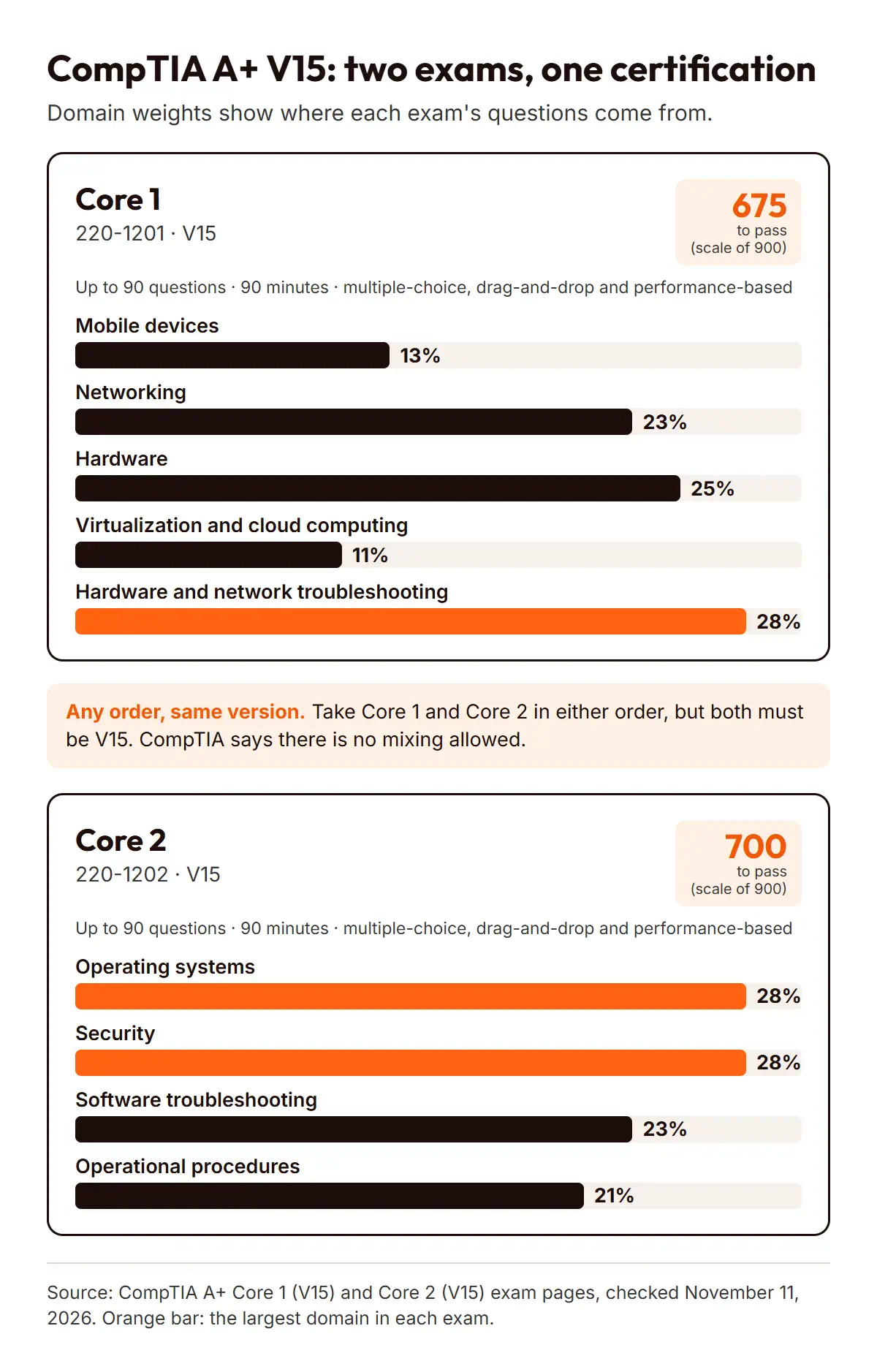
CompTIA publishes a weight for every domain. The weights show where most of each exam’s questions come from, so they are a reliable guide to where your study time should go.
Core 1 (220-1201)
| Mobile devices | 13% |
|---|---|
| Networking | 23% |
| Hardware | 25% |
| Virtualization and cloud computing | 11% |
| Hardware and network troubleshooting | 28% |
Core 2 (220-1202)
| Operating systems | 28% |
|---|---|
| Security | 28% |
| Software troubleshooting | 23% |
| Operational procedures | 21% |
If you are still deciding whether A+ is the right first certification, our guide to choosing between A+ and Network+ (opens in a new tab) covers that decision.
Know the exams
Which exam to take first
CompTIA lets you take Core 1 and Core 2 in any order. The one rule is that both must be from the same version: CompTIA says there is “no mixing allowed”. If you start with a V15 exam, finish with V15.
This is EvolveSkill’s guidance: many people start with Core 1 because hardware and networking give them a mental model of the devices that Core 2’s operating system and security topics run on. If you already work with Windows and user support every day, starting with Core 2 can make sense. Either way, book the second exam while the first is still fresh.
Plan and practice
A week-by-week study plan
This plan is EvolveSkill’s guidance, not CompTIA data. CompTIA doesn’t publish a recommended study time, so adjust the pace to your experience and the hours you have.
| 1–2 | Core 1 | Hardware (25%) and mobile devices (13%): components, peripherals, laptops and mobile setup |
|---|---|---|
| 3–4 | Core 1 | Networking (23%) and virtualization and cloud (11%): ports, protocols, wireless, client virtualization |
| 5–6 | Core 1 | Hardware and network troubleshooting (28%), then practice and review |
| 7–8 | Core 2 | Operating systems (28%): Windows installation, tools and settings, plus macOS and Linux basics |
| 9–10 | Core 2 | Security (28%) and software troubleshooting (23%) |
| 11–12 | Core 2 | Operational procedures (21%), then practice and review |
Someone new to IT may need longer per block, and someone already in a support role may need less. What matters is covering every objective and practicing hands-on, not finishing on a set date.
Plan and practice
Use the exam objectives as your checklist
Each V15 exam page on CompTIA’s site includes an exam objectives summary for that exam. Treat the objectives as your syllabus:
- List every objective for the exam you are studying.
- Mark each one as “can explain”, “can do” or “not yet”.
- Plan your next study session around the “not yet” items, starting with the heaviest domains.
Check that any book, course or video you use says it covers 220-1201 and 220-1202 (V15). Material written for an older version can teach topics that are no longer on the exam.
Plan and practice
Study resources, official first
CompTIA lists its own CertMaster products on the A+ exam pages, including CertMaster Learn (lessons), CertMaster Labs (hands-on practice) and CertMaster Practice, which CompTIA describes as timed practice exams, objective quizzes and exam objective mastery scores. You don’t need them to pass, but they are built to the current objectives.
Independent books, video courses and practice tests can also work well. Choose ones that name the V15 exam codes and explain answers rather than just listing them.
Avoid “brain dumps” and anything sold as real exam questions. CompTIA’s candidate agreement prohibits seeking or obtaining unauthorized access to exam materials, including brain dump material.
Plan and practice
Practice the right way
A+ includes performance-based questions, so reading alone isn’t enough. This is EvolveSkill’s guidance on how to practice:
- Hardware: if you can, take apart and rebuild an old PC, and install memory, drives and expansion cards.
- Operating systems: install Windows and a Linux distribution in a virtual machine, then practice settings, command-line tools and user management.
- Networking: set up a home router, check IP settings, and practice basic commands such as
ipconfig,pingandtracert. - Troubleshooting: for each problem you study, write down the symptom, the likely causes in order, and how you would test each one.
- Practice tests: use them to find weak domains, then go back to the objectives. Don’t memorize answers.
Book and sit them
Readiness signals before you book
This checklist is EvolveSkill’s guidance. You are likely ready to book an exam when:
- Every objective on your checklist is marked “can explain” or “can do”.
- Your practice-test results are consistent across several attempts, with no domain far behind.
- You can complete hands-on tasks, such as configuring a network setting or fixing a startup problem, without step-by-step notes.
- You can finish a full practice exam within 90 minutes.
Book and sit them
Booking and exam day
CompTIA delivers its exams in person at Pearson VUE test centers or online through OnVUE. When you book, check that your booking shows the V15 exam code.
Retakes. CompTIA’s retake policy has no waiting period between your first and second attempt at an exam. Before a third or later attempt, you must wait at least 14 calendar days from your last attempt. You pay the exam price for every attempt, and CompTIA offers no free retests.
Vouchers. If you plan to pay with a voucher, our guide to choosing the right CompTIA exam voucher (opens in a new tab) explains what to check first. EvolveSkill’s CompTIA exam voucher collection (opens in a new tab) lists the exams it currently offers; make sure the product names 220-1201 or 220-1202.
After you pass. A+ is good for three years from the date you pass. CompTIA’s continuing education program lets you renew it, and A+ renewal requires 20 continuing education units (CEUs).
Book and sit them
Common mistakes
- The mistake
- studying from material for an older A+ version.
Why it happens: older books and videos are still widely shared.
The fix: check that every resource names 220-1201 and 220-1202 (V15). - The mistake
- spending most of your time on the domains you enjoy.
Why it happens: familiar topics feel productive.
The fix: follow the weights. In Core 1, troubleshooting alone is 28% of the exam. - The mistake
- leaving a long gap between Core 1 and Core 2.
Why it happens: passing one exam feels like the job is done.
The fix: plan both exams from the start, and keep the same version for both.
Book and sit them
Next steps
- Decide which exam you will take first, and write down the objectives for it.
- Work through the plan above, heaviest domains first, with hands-on practice each week.
- Use the readiness signals to decide when to book.
- After A+, many people move to networking. Our Network+ N10-009 study guide (opens in a new tab) covers that exam, and our CompTIA certification path guide (opens in a new tab) shows what comes after.
Reference
Frequently asked questions
How many exams are in CompTIA A+, and can I take them in any order?
There are two exams: Core 1 (220-1201) and Core 2 (220-1202). CompTIA lets you take them in any order. Both must be from the same version, and CompTIA says no mixing is allowed, so if you pass a V15 exam first, your second exam must also be V15. You need to pass both to earn A+.
What score do I need to pass Core 1 and Core 2?
You need 675 to pass Core 1 and 700 to pass Core 2. CompTIA states both scores “on a scale of 900”. Each exam has a maximum of 90 questions in 90 minutes, including performance-based questions, so practice hands-on tasks as well as multiple-choice questions before you book either exam.
How long should I study for A+?
CompTIA doesn’t publish a study time. As EvolveSkill’s guidance, the 12-week plan above is a reasonable starting point for someone studying part time, but your pace depends on your experience. CompTIA recommends 12 months of hands-on experience in an IT support role, so newcomers should expect to need more practice time.
Where do I find the official A+ exam objectives?
Each V15 exam page on CompTIA’s website, for Core 1 and for Core 2, includes an exam objectives summary. Use it as your checklist and mark each objective as you learn it. Make sure any objectives document you use names 220-1201 or 220-1202, because older versions cover different content.
Are free A+ “dumps” or real exam question sites safe to use?
No. CompTIA’s candidate agreement prohibits seeking or obtaining unauthorized access to exam materials, which it says includes brain dump material. Dump sites also often contain wrong or outdated answers. Use practice tests that explain answers, and study from the exam objectives instead.
What happens if I fail an A+ exam?
You can retake it. CompTIA’s retake policy has no waiting period between your first and second attempt. Before a third or later attempt, you must wait at least 14 calendar days from your last attempt. You pay the exam price each time, and CompTIA doesn’t offer free retests or retake discounts.
Reference
Sources
All checked on CompTIA’s website on November 11, 2026:
- CompTIA: A+ certification (two exams, any order)
- CompTIA: A+ Core 1 (V15) (exam details, passing score, domains, CertMaster)
- CompTIA: A+ Core 2 (V15) (exam details, passing score, domains, CertMaster)
- CompTIA: Certification retake policy (waiting periods, fees)
- CompTIA: Candidate agreement (unauthorized materials)
- CompTIA: Schedule an exam (test center and OnVUE)
- CompTIA: How long does A+ last? and continuing education (three years, 20 CEUs)
Article record
- Dates
